Chapter 1: Getting Started with the DJI Pocket 2
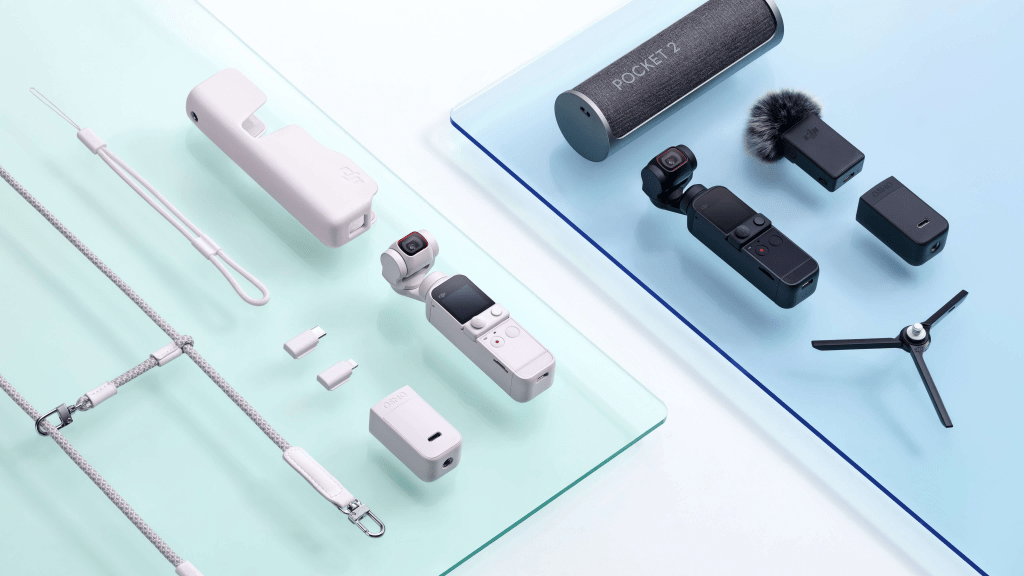
Unboxing and Setup: When you first unbox your DJI Pocket 2, you’ll find:
- The Pocket 2 Camera: The main unit with an integrated gimbal and camera.
- Charging Cable: Used to charge the device.
- Wrist Strap: To securely carry the Pocket 2.
- Documentation: Includes user manual and safety information.
Initial Setup:
- Charge the Battery: Connect the Pocket 2 to a power source using the supplied cable. A full charge ensures you can maximize your shooting time.
- Install the DJI Mimo App: Download the DJI Mimo app from the App Store or Google Play. This app is essential for controlling the Pocket 2 and accessing advanced features.
- Pair the Camera with Your Phone: Open the DJI Mimo app, follow the on-screen instructions to pair your device, and complete the initial setup process.
Firmware Update:
- Connect to Wi-Fi: Ensure your device is connected to the internet.
- Open the DJI Mimo App: Navigate to the firmware update section.
- Check for Updates: Follow the prompts to download and install any available firmware updates. This process ensures you have the latest features and bug fixes.
Chapter 2: Understanding the Controls and Modes
Main Interface:
- Touchscreen Navigation:
- Swipe Down: Access quick settings, including resolution, frame rate, and gimbal settings.
- Swipe Up: View your photo and video gallery.
- Swipe Left/Right: Switch between photo and video modes.
- Buttons and Ports:
- Power Button: Turn the device on/off.
- Record Button: Start/stop recording.
- Joystick: Control the gimbal’s tilt and pan.
Shooting Modes:
- Standard Mode: Provides a balance between ease of use and quality, perfect for everyday shots.
- Pro Mode: Allows manual adjustments for ISO, shutter speed, and white balance. Ideal for those who want full control over their settings.
- ActiveTrack: Follow a subject automatically. Simply tap on the subject on the screen to engage ActiveTrack.
- Timelapse/Hyperlapse: Capture scenes over time. Timelapse compresses time, while Hyperlapse combines movement with time lapse for dynamic shots.
- Slow Motion: Capture high-frame-rate footage for dramatic slow-motion effects. Adjust frame rates in the settings for desired slow-motion speed.
Chapter 3: Mastering Stabilization and Movement
Gimbal Controls:
- Understanding Axis Movements:
- Pan Axis: Allows left/right rotation.
- Tilt Axis: Allows up/down tilt.
- Roll Axis: Maintains level horizon.
- Practicing Movements:
- Panning: Smoothly rotate the Pocket 2 left or right.
- Tilting: Adjust the camera up or down while moving.
- Rolling: Keep the horizon level to avoid tilted shots.
Tips for Smooth Footage:
- Hold Steady: Keep the Pocket 2 close to your body for stability.
- Use a Tripod or Mount: For stationary shots, a tripod or mount provides extra stability.
- Practice Movements: Move slowly and smoothly to avoid jerky footage. Practice different movements to find what works best for your style.
Chapter 4: Exploring Advanced Features
3x Zoom:
- Using Optical Zoom: Adjust the zoom level to get closer to your subject without losing image quality. Zoom controls are accessible via the touchscreen or the app.
- Maintaining Focus: Be mindful of the zoom level to ensure sharp focus and clarity.
Night Shot Mode:
- Switching Modes: Access Night Shot mode through the settings menu. The camera optimizes settings for low-light conditions.
- Capturing in Low Light: Hold the camera steady or use a tripod to avoid blur. Experiment with different settings to achieve the best results.
Audio Enhancements:
- Using the DJI Wireless Microphone: Attach the microphone to capture clear audio. It’s especially useful for vlogging or interviews.
- Adjusting Audio Settings: Ensure proper audio levels through the app to avoid distortion.
Chapter 5: Editing and Sharing Your Content
Using the DJI Mimo App:
- Editing Tools:
- Trim Clips: Cut unwanted sections from your video.
- Add Music: Incorporate background music from the app’s library.
- Apply Filters: Enhance your footage with creative filters.
- Sharing Your Content:
- Export Options: Save your edited video in various resolutions and formats.
- Social Media Integration: Directly share your content to platforms like Instagram, Facebook, and YouTube.
Creative Tips:
- Add Music and Effects: Choose tracks and sound effects that complement your video’s mood and theme.
- Use Creative Filters: Experiment with filters to give your footage a unique style and feel.
- Engage with Your Audience: Share behind-the-scenes content or create tutorial videos to build a connection with your viewers.
Chapter 6: Maintaining and Accessorizing Your DJI Pocket 2
Regular Maintenance:
- Cleaning: Use a soft, dry cloth to clean the lens and gimbal. Avoid using harsh chemicals.
- Firmware Checks: Regularly check for and install firmware updates to keep your device functioning optimally.
Accessories:
- Expansion Kit: Includes a tripod, wide-angle lens, and wireless microphone. Each accessory enhances different aspects of your shooting experience.
- Protective Cases: Consider a protective case for safe transport and storage.
Conclusion:
Mastering the DJI Pocket 2 opens up a world of creative possibilities for capturing stunning videos and photos. By understanding the controls, practicing stabilization techniques, and utilizing advanced features, you can transform ordinary moments into extraordinary content. Whether you’re recording everyday moments or crafting cinematic masterpieces, the DJI Pocket 2 offers the tools and flexibility to elevate your content creation.
For more tips, tutorials, and creative ideas on using the DJI Pocket 2 and other tech tools, don’t forget to check out my YouTube channel. Your journey to mastering these tools starts here, so subscribe and stay tuned for more exciting content and hands-on guides!
 EliteExtant